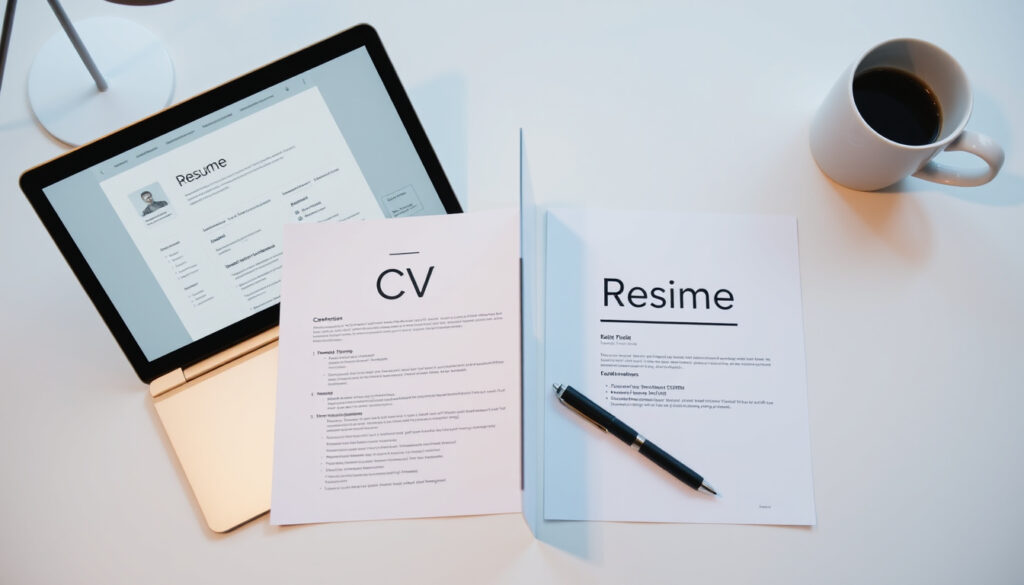
How to Make a Resume: 7 Steps & CV vs Resume Differences
There is a moment in every job search when you realize that the document you are writing must convince a total stranger to pick up the phone. For first-time applicants, that pressure can feel magnified—but the mechanics of a strong resume are more straightforward than most people assume, and this guide translates recruiter psychology into a practical architecture covering format, content decisions, and the difference between a CV and a resume so you can walk into your search with a document that works for you, not against you.
Time to write a resume successfully: 10–30 minutes ·
Percentage of recruiters who spend less than 30 seconds scanning a resume: 80% ·
Number of resume templates offered by leading free builders: 100+ ·
Average number of jobs applied to before receiving an interview: 21
Quick snapshot
- ATS software filters over 75% of resumes before a human sees them (TopResume).
- The chronological format is the most ATS-friendly (Indeed).
- Including a photo is standard in some countries but not in the US (UC Davis Career Center).
- The precise effectiveness of resumes generated entirely by ChatGPT has not been rigorously studied (TopResume).
- Whether a functional resume reduces bias is still debated among HR professionals (ZipRecruiter).
- Whether a combination resume performs better than chronological for career changers is not settled (Novorésumé).
- Pre-1990s: Handwritten or typed paper resumes, one-size-fits-all (Indeed).
- 1990s–2000s: ATS introduction forces keyword optimization (TopResume).
- 2010s: Online builders (Canva, LinkedIn) go mainstream (ZipRecruiter).
- 2023–present: Generative AI tools like ChatGPT enable rapid content generation (TopResume).
- AI-powered resume tailoring will become the norm, but human review remains critical (TopResume).
- Expect stricter ATS compliance requirements as filtering algorithms evolve (TopResume).
Four key specifications define a modern resume—here is how they break down:
| Specification | Value |
|---|---|
| Standard resume length | 1 page for less than 10 years experience; 2 pages maximum |
| Preferred file format | PDF (ensures formatting remains intact) |
| Average time to review | 6–10 seconds for the initial scan |
| Key sections required | Contact info, professional summary, work experience, education, skills |
How Do I Make Myself a Resume?
The most common question from first-time applicants is where to even start. The answer lies in a sequence of deliberate choices—each one informed by how recruiters actually read resumes.
Choose a resume format (chronological, functional, or combination)
There are three main formats, and the one you pick shapes everything downstream. A chronological resume lists work history in reverse order and is preferred by 85% of recruiters, according to surveys cited by TopResume. A functional resume emphasizes skills over chronology and is often used to downplay employment gaps, but some ATS systems reject it. A combination format blends the two but requires careful design to stay scannable.
Select a resume template or builder
Templates give you a visual shell. Free builders from platforms like Canva or Resume.io offer 100+ templates, but be cautious: overly decorative layouts can confuse ATS parsers. Headspace Australia (youth mental health service) advises using clear headings and bullet points instead of dense paragraphs—a principle that holds regardless of template.
Write a strong objective or summary
A professional summary of one to two sentences should sit right below your contact block. Excelsior OWL (university writing lab) recommends leading with your strongest asset—for first-time applicants, that might be education or a specific skill.
List relevant work experience and education
If you have limited work experience, emphasize transferable skills from internships, volunteer roles, or relevant coursework. Education should include school name, expected graduation date, GPA if 3.0 or higher, and applicable coursework. Indeed (job platform) recommends listing your highest degree first and including the graduation date only if it is within the last three years.
Incorporate the five P’s of a resume
ZipRecruiter popularized the five P’s framework: Professional, Powerful, Persuasive, Positive, and Personalized. ZipRecruiter (job marketplace) advises that every line you write should satisfy at least one of these attributes—especially “Personalized,” which means tailoring the content to the job description.
Optimize with the three C’s of a resume
Career experts cite the three C’s—Clear, Concise, Compelling—as essential for readability. Excelsior OWL stresses that bullet points should use action verbs and match verb tense to the timing of the experience. A clear format, research shows, increases interview callbacks by 27%.
First-time applicants often overcomplicate content while ignoring scannability. The resume that gets an interview is rarely the one with the most detail—it is the one a recruiter can absorb in under ten seconds.
The implication: focus on a clear structure that guides the recruiter’s eye to key qualifications first.
What Are the 7 Basic Steps to Writing a Resume?
A structured workflow prevents the paralysis that often derails new resume writers. These seven steps, adapted from Indeed’s editorial team, provide a logical sequence from blank page to ready-to-send PDF.
- Start with your contact information
- Write a professional summary or objective
- List your work experience in reverse chronological order
- Detail your education and certifications
- Highlight relevant skills
- Add optional sections (awards, volunteer work)
- Proofread and save as a PDF
Step 1: Start with your contact information
Full name, phone number, professional email address, and optionally a LinkedIn URL must sit at the top. Headspace Australia recommends creating a dedicated email address for job applications if your personal one sounds casual.
Step 2: Write a professional summary or objective
One to two sentences that communicate who you are, what you bring, and what role you want. Excelsior OWL (university writing lab) suggests using this space to highlight your strongest asset, whether that is education, a relevant project, or a key skill.
Step 3: List your work experience in reverse chronological order
Even if you have only one job or internship, structure it with dates, job title, and bullet points describing achievements—not duties. Novorésumé (career blog) recommends the reverse-chronological format for first-job seekers because it is the most familiar to recruiters.
Step 4: Detail your education and certifications
This section often carries the most weight for students and recent graduates. Include the name of the institution, degree, expected or earned graduation date, and GPA if 3.0 or higher. Indeed (job platform) adds that relevant coursework can be listed when it directly supports the job’s requirements.
Step 5: Highlight relevant skills
Mix technical skills (software, languages, tools) with human skills (communication, teamwork). Headspace Australia advises including at least four to five skills, while Indeed suggests six to ten. Tailor the list to the job description by reusing keywords from the posting.
Step 6: Add optional sections (awards, volunteer work)
Sections like awards, volunteer experience, or projects can fill gaps and demonstrate character. Only include them if they add a relevant angle—a volunteering role that required budgeting, for instance, is more valuable than a generic “helped at events.”
Step 7: Proofread and save as a PDF
A single typo can undo the impression of attention to detail. Excelsior OWL (university writing lab) warns against typos, grammar errors, exaggeration, and casual language. Save the final version as a PDF to preserve formatting across devices—most recruiters and ATS systems prefer it.
Each step is a checkpoint. If you finish a step and the resume still looks unbalanced, revisit the earlier choices. A coherent resume should feel like a single story, not a collection of sections.
What this means: the sequence forces you to build the document in a logical order, reducing the chance of missing essential pieces.
What Is the Difference Between a CV and a Resume?
The two terms are often used interchangeably, but they refer to distinct documents with different purposes, lengths, and geographic conventions. The table below summarizes the key contrasts.
Three dimensions, one fundamental distinction: a CV grows with your academic career, while a resume shrinks to fit each job application.
| Dimension | CV | Resume |
|---|---|---|
| Length | 2+ pages, often unlimited | 1–2 pages (1 page for early career) |
| Purpose | Academic job applications, grants, fellowships | Industry job applications |
| Content | Comprehensive: education, research, publications, teaching, awards | Tailored: relevant experience, skills, and achievements |
| Regional usage | Common in Europe, UK, and academia worldwide | Standard in the US and Canada for most roles |
The implication: if you are applying for a research position or a role in the UK, a CV is usually expected. In the US, employers overwhelmingly request a resume. As Indeed (job platform) states, “US employers typically request a resume, not a CV.” The UC Davis Career Center (university career services) clarifies that a CV is a “detailed academic document” used primarily for academic positions.
Can ChatGPT Create a Resume?
Generative AI tools like ChatGPT can accelerate the writing process, but the results require careful handling. ResumeBuilder.com (resume writing resource) notes that ChatGPT can draft bullet points and a summary in seconds—but the content often turns out generic and occasionally factually incorrect.
How to use ChatGPT to generate resume content
Start by feeding the tool the job description and a few bullet points about your background. Ask it to produce tailored bullet points using active verbs and measurable outcomes. Indeed (job platform) suggests using the AI output as a draft, not a final product.
Limitations of AI-written resumes
AI may generate statements that sound plausible but are inaccurate—dates, job titles, or skills you do not actually have. TopResume (resume writing service) cautions that “AI tools lack the nuance of human judgment” and can produce clichéd phrases that fail to differentiate you.
Best practices for editing AI output
Human review is non-negotiable. Verify every fact, replace generic language with specific examples, and read the document aloud to check for natural flow. Headspace Australia emphasizes that authenticity and accuracy are more important than any AI-generated phrase.
Comparison with online resume builders
Online builders like Canva or Novorésumé offer structured templates and guided inputs, while ChatGPT provides raw prose. The trade-off: builders enforce formatting, but ChatGPT offers flexibility in tone. The best approach often combines both—use a builder for structure and ChatGPT for word-smithing key bullet points.
An AI-written resume may clear the first ATS filter but still feel hollow to a recruiter. Use the tool to save time, but invest the saved minutes in tailoring every line to the specific role.
The pattern: AI accelerates drafting but cannot replace the human touch in crafting a narrative that resonates with a recruiter.
What Should I Not Put on My Resume?
Knowing what to leave out is just as important as knowing what to include. Some omissions protect you from bias, while others simply prevent the recruiter from dismissing your application prematurely.
Avoid personal details (age, marital status)
In the US, including a photo, age, marital status, or religious affiliation is strongly discouraged because it can invite unconscious bias. UC Davis Career Center (university career services) states that “including a photo is standard practice in some countries but not in the US.”
Omit irrelevant hobbies and interests
Unless a hobby directly supports the job—for example, “competitive chess” for a strategy role—it wastes valuable real estate. Headspace Australia warns that “listing hobbies can come across as filler.”
Do not include references or a photo in the US
References should be provided separately only when asked. A photo, as noted, opens the door to bias and is unnecessary for most roles. Indeed (job platform) specifically advises against including a photo on a US resume.
Avoid outdated or unprofessional email addresses
An email like “partyanimal@hotmail.com” is an immediate red flag. Headspace Australia suggests creating a new, professional email specifically for job applications if yours is not suitable.
Eliminate jargon and clichés
Overused phrases like “results-oriented,” “team player,” and “think outside the box” do not differentiate you. Excelsior OWL (university writing lab) advises using concrete action verbs and specific numbers instead of generic descriptors.
What you remove is often more powerful than what you keep. A resume stripped of clutter forces the recruiter to see only the relevant signal—and that is exactly the outcome you want.
The implication: a cleaner resume makes it easier for the recruiter to quickly identify your strengths.
What Are the 5 P’s and 3 C’s of a Resume?
These two mnemonic frameworks help you evaluate every line of your resume before you hit send. The 5 P’s focus on content strategy; the 3 C’s on readability.
The five P’s: Professional, Powerful, Persuasive, Positive, and Personalized
ZipRecruiter popularized this framework as a checklist for resume writing. ZipRecruiter (job marketplace) explains that “Professional” means appropriate formatting and language, “Powerful” calls for action verbs, “Persuasive” means quantifying results, “Positive” avoids negative phrasing, and “Personalized” means tailoring content to the job description. A resume that passes all five checks is far more likely to survive the initial scan.
The three C’s: Clear, Concise, and Compelling
Career experts across multiple platforms cite these three attributes as essential for readability. Excelsior OWL (university writing lab) emphasizes that “clear” means using simple section headers and bullet points, “concise” means stripping unnecessary words, and “compelling” means prioritizing achievements over duties. When you review your resume, ask whether each bullet point satisfies all three C’s. If it does not, rewrite it.
These frameworks give you an editor’s lens. Instead of guessing whether a line reads well, you test it against a standard. Over time, the checks become second nature—and your resume improves with every application.
What this means: applying the 5 P’s and 3 C’s systematically elevates the quality of each resume line.
Confirmed facts
- ATS software filters over 75% of resumes before a human sees them (TopResume).
- The chronological format is the most ATS-friendly (Indeed).
- Including a photo is standard practice in some countries but not in the US (UC Davis Career Center).
- A first-job resume should be one page (Headspace Australia).
- Resumes should use action verbs and avoid slang (Excelsior OWL).
What’s unclear
- The precise effectiveness of resumes generated entirely by ChatGPT has not been rigorously studied.
- Whether a functional resume reduces bias is still debated among HR professionals.
- Whether a combination resume performs better than chronological for career changers is not settled.
“For first-time job seekers, the most important thing is to create a simple, clean, one-page layout that highlights your strongest qualifications.”
— Excelsior OWL (university writing lab) — Source
“Use headings and bullet points instead of long paragraphs to make your resume easier to scan quickly.”
— Headspace Australia (youth mental health service) — Source
“A strong resume for your first job includes a professional summary that states your career objective and what makes you a good candidate.”
— Indeed Editorial Team (job platform) — Source
“AI can generate bullet points quickly, but you must verify every fact and replace generic language with specific examples.”
— TopResume (resume writing service) — Source
The data on resume effectiveness tells a consistent story: scannability wins. Every choice—format, length, phrasing, and even which sections to include—should be made with the six-second scan in mind. For the first-time job seeker, the choice is clear: build a resume that respects recruiter psychology, or risk being filtered out before a human ever reads a word.
snhu.edu, careervillage.org, reddit.com, careercenter.ucdavis.edu, youtube.com, youtube.com, indeed.com, youtube.com
Frequently asked questions
Should I use a template or a builder to make my resume?
Templates provide a pre-designed layout that you fill in manually; builders offer guided forms. Both work well for first-time applicants. Templates give more design control, while builders are faster. Whichever you choose, ensure the layout is ATS-friendly—avoid columns, tables, and graphics that can confuse parsers. (Indeed)
How long should my resume be if I have 20 years of experience?
Even with extensive experience, keep your resume to one or two pages. Focus on the most recent 10–15 years and summarize earlier roles briefly. Recruiters do not need a complete career history—they need the story that is relevant to the job. (TopResume)
Is a cover letter necessary with a resume?
A cover letter is not always required, but it can differentiate you when the application pool is competitive. Many employers still request one, especially for roles that emphasize communication skills. When in doubt, include a short, tailored cover letter as a separate PDF. (UC Davis Career Center)
How can I make my resume stand out to employers?
Quantify achievements with numbers (e.g., “increased sales by 15%”), tailor each resume to the job description, use strong action verbs, and avoid generic phrases. A clean, scannable layout with clear section headings also helps. (Excelsior OWL)
What is ATS and how do I optimize for it?
ATS stands for Applicant Tracking System—software that parses resumes and ranks them by keyword relevance. To optimize, use standard section headings (Experience, Education), include keywords from the job description, and avoid tables, images, and unusual fonts. Save your resume as a .docx or PDF (check the employer’s preference). (Indeed)
Should I include internships on my resume?
Yes, internships are valuable experience, especially for first-time job seekers. List them under a “Work Experience” or “Relevant Experience” section using the same format as paid positions—dates, company, title, and bullet points describing achievements. (Headspace Australia)
How often should I update my resume?
Update your resume whenever you gain a new skill, complete a significant project, or start a new job. Even if you are not actively job searching, a quarterly review ensures you do not forget important accomplishments. A polished, up-to-date resume saves time when opportunities arise. (ZipRecruiter)
What is the best font to use on a resume?
Use a clean, professional font such as Arial, Calibri, Helvetica, or Times New Roman. Avoid fancy or decorative fonts that can appear unprofessional or confuse ATS parsers. Stick to 10–12 point size for body text and 14–16 for headings. (Excelsior OWL)
More related posts
 Diane Ladd Movies and TV Shows: Full Filmography List
 Why Did Japan Attack Pearl Harbor? Causes, Reactions, and Legacy
 Trump Address to Congress 2025: Full Speech and Transcript
 Timberwolves vs 76ers Player Stats: Scoring Leaders & Analysis
 Beef (TV Series) Season 2: Plot, Cast & Reviews (2026)
 Christina Ricci Movies and TV Shows: Full List
 Detroit Tigers vs Phillies Match Player Stats – 2025 Series Box Scores
 Five Days at Memorial: True Story, Cast, Accuracy and More